Auth Codes
Auth Codes are an optional security layer that adds a shared secret to your API requests. Think of them as API keys: a caller must include the correct code alongside their request, otherwise the plugin rejects it.
You can require an Auth Code for any combination of the following operations:
- Auto-login
- Register User
- Delete User
- Reset Password and Change Password
- Authenticate (JWT generation)
Use long, random strings for Auth Code values. Short or predictable codes offer little protection. Treat them like passwords - store them securely and rotate them if they are compromised.
Settings
Go to Settings → Simple JWT Login → Auth Codes to configure.
Auth Code URL Key
The query parameter name (or body field name) clients must use to pass the code in requests. Default: AUTH_KEY.
?AUTH_KEY=THISISMySpeCiaLAUthCode
Change this if you want to avoid exposing that your site uses Simple JWT Login, or if you need to avoid a name collision.
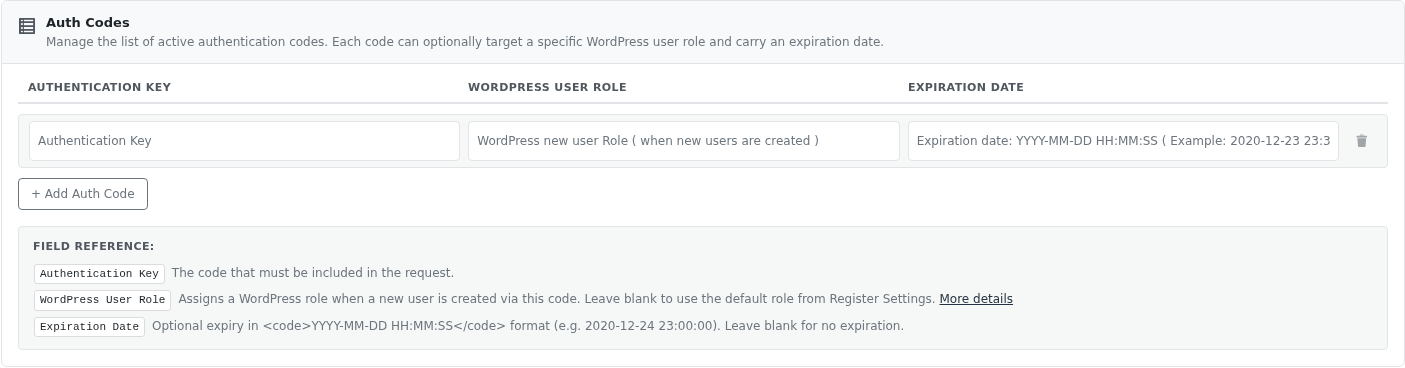
Auth Codes list
Each code is a row with three fields - add as many codes as you need. You can have different codes for different purposes (e.g. one for mobile apps, one for server-to-server integrations).

Auth Code structure
Each Auth Code has three fields:
| Field | Description |
|---|---|
| Authentication Key | The actual code value that must be included in requests using the Auth Code URL Key parameter name (default: AUTH_KEY). |
| WordPress User Role | (Optional) When set, users registered using this code are assigned this role instead of the default role configured in Register Settings. Useful for creating multiple user tiers (e.g., "premium" vs "free") from a single endpoint. |
| Expiration Date | (Optional) The date and time after which this code is no longer accepted. Format: Y-M-D H:m:s - e.g., 2025-12-31 23:59:59. |
Leaving the expiration date blank means the code never expires.
