Reset password
Simple JWT Login exposes a two-step password reset flow entirely through the REST API. Step 1 requests a reset code and delivers it by email; Step 2 applies the new password using that code. Both steps share the same endpoint URL with different HTTP methods.
Step 1 - Request Reset Code
Send the user's email address to trigger the reset flow. The plugin generates a one-time code and delivers it according to the configured Reset Flow option.
Explore and test this step using the interactive API reference →
Endpoint
METHOD: POST
ENDPOINT: /simple-jwt-login/v1/user/reset_password
URL Example: https://{{yoursite}}/?rest_route=/simple-jwt-login/v1/user/reset_password&email={{email}}&AUTH_KEY={{AUTH_KEY_VALUE}}
PARAMETERS:
| Parameter | Type | Description |
|---|---|---|
email | required string | The email address for which the password reset is requested. |
AUTH_KEY | optional string | Auth Code value. Required only if "Require Authentication Code" is enabled. The parameter name matches the Auth Code URL Key in Auth Codes settings (default: AUTH_KEY). |
Request
{
  "email": "test@simplejwtlogin.com"
}
With optional Auth Code:
{
  "email": "test@simplejwtlogin.com",
  "AUTH_KEY": "MY_SECRET_AUTH_KEY"
}
Responses
200
{
  "success": true,
  "message": "Reset password email has been sent."
}
400
Bad request - the email field is missing.
{
  "success": false,
  "data": {
    "message": "Email is required.",
    "errorCode": 59
  }
}
401
Unauthorized - the provided auth code is invalid or missing when required.
{
  "success": false,
  "data": {
    "message": "Invalid auth code.",
    "errorCode": 58
  }
}
403
Forbidden - password reset is disabled in plugin settings.
{
  "success": false,
  "data": {
    "message": "Reset password is not allowed.",
    "errorCode": 56
  }
}
404
No WordPress user with the provided email address was found.
{
  "success": false,
  "data": {
    "message": "User not found.",
    "errorCode": 64
  }
}
500
Internal server error (e.g. email sending failure).
{
  "success": false,
  "data": {
    "message": "An unexpected error occurred.",
    "errorCode": 22
  }
}
Examples
SHELL
curl -X POST https://simplejwtlogin.com/wp-json/simple-jwt-login/v1/user/reset_password \
  -H "Content-type: application/json" \
  -d '{"email":"test@simplejwtlogin.com"}'
PHP
$simpleJwtLogin = new \SimpleJwtLoginClient\SimpleJwtLoginClient(
    'https://simplejwtlogin.com',
    '/simple-jwt-login/v1'
);
$result = $simpleJwtLogin->resetPassword('email@simplejwtlogin.com', 'AUTH CODE');
JavaScript
fetch('https://simplejwtlogin.com/wp-json/simple-jwt-login/v1/user/reset_password', {
  method: 'POST',
  headers: { 'Content-Type': 'application/json' },
  body: JSON.stringify({ email: 'test@simplejwtlogin.com' })
}).then(r => r.json()).then(console.log);
Error responses
| Code | Meaning |
|---|---|
56 | Password reset is not enabled in plugin settings. |
58 | Invalid Auth Code provided. |
59 | Email address is missing from the request. |
64 | No WordPress user found with the provided email address. |
65 | Invalid flow type configured in plugin settings. |
66 | The {{CODE}} variable is missing from the custom email template. |
Step 2 - Set New Password
Submit the reset code from Step 1 along with the new password. Alternatively, if "Allow Reset password with JWT" is enabled in settings, a valid JWT can be used instead of the code.
Explore and test this step using the interactive API reference →
Endpoint
METHOD: PUT
ENDPOINT: /simple-jwt-login/v1/user/reset_password
URL Example: https://{{yoursite}}/?rest_route=/simple-jwt-login/v1/user/reset_password&email={{email}}&code={{code}}&new_password={{new_password}}
PARAMETERS:
| Parameter | Type | Description |
|---|---|---|
email | required string | The email address of the account being reset. |
code | required string | The reset code received by email. Not required when a valid JWT is provided and "Allow Reset password with JWT" is enabled. |
new_password | required string | The new password to set for the account. |
AUTH_KEY | optional string | Auth Code value. Required only if "Require Authentication Code" is enabled. |
JWT | optional string | Valid JWT identifying the user. When provided and JWT-based reset is enabled, the code parameter is not required. |
Request
{
  "email": "test@simplejwtlogin.com",
  "code": "MY_CODE",
  "new_password": "YOUR_SECRET_PASSWORD"
}
Using a JWT instead of a reset code:
{
  "email": "test@simplejwtlogin.com",
  "JWT": "YOUR_JWT_HERE",
  "new_password": "YOUR_SECRET_PASSWORD"
}
Responses
200
{
  "success": true,
  "message": "User password has been changed."
}
400
Bad request - email, code, or new_password is missing.
{
  "success": false,
  "data": {
    "message": "New password is required.",
    "errorCode": 61
  }
}
401
Unauthorized - the JWT is invalid or expired, or was already used for a password reset.
{
  "success": false,
  "data": {
    "message": "This JWT cannot be used to change the password.",
    "errorCode": 93
  }
}
403
Forbidden - password reset is disabled in plugin settings.
{
  "success": false,
  "data": {
    "message": "Reset password is not allowed.",
    "errorCode": 56
  }
}
404
No WordPress user with the provided email address was found.
{
  "success": false,
  "data": {
    "message": "User not found.",
    "errorCode": 64
  }
}
422
Unprocessable entity - the one-time reset code is invalid or expired.
{
  "success": false,
  "data": {
    "message": "Invalid reset password code.",
    "errorCode": 62
  }
}
500
Internal server error.
{
  "success": false,
  "data": {
    "message": "An unexpected error occurred.",
    "errorCode": 22
  }
}
Examples
SHELL
curl -X PUT https://simplejwtlogin.com/wp-json/simple-jwt-login/v1/user/reset_password \
  -H "Content-type: application/json" \
  -d '{"email":"test@simplejwtlogin.com","code":"123","new_password":"test"}'
PHP
$simpleJwtLogin = new \SimpleJwtLoginClient\SimpleJwtLoginClient(
    'https://simplejwtlogin.com',
    '/simple-jwt-login/v1'
);
$result = $simpleJwtLogin->changePassword('email@simplejwtlogin.com', 'new password', 'code', null, 'AUTH CODE');
JavaScript
fetch('https://simplejwtlogin.com/wp-json/simple-jwt-login/v1/user/reset_password', {
  method: 'PUT',
  headers: { 'Content-Type': 'application/json' },
  body: JSON.stringify({
    email: 'test@simplejwtlogin.com',
    code: '123',
    new_password: 'test'
  })
}).then(r => r.json()).then(console.log);
Error responses
| Code | Meaning |
|---|---|
56 | Password reset is not enabled in plugin settings. |
60 | The reset code is missing from the request. |
61 | The new password is missing from the request. |
62 | The reset code is invalid or does not match the email address. |
63 | Email address is missing from the request. |
64 | No WordPress user found with the provided email address. |
93 | The provided JWT cannot be used to change the password. |
JWT decoding errors (1-22) may also appear when a JWT is supplied and cannot be parsed or its signature is invalid.
Settings
Configure under Settings → Simple JWT Login → Reset Password.
Password Reset

Enable or disable the password reset feature. When disabled, both Step 1 and Step 2 return a 403 error.
Require Authentication Code

When enabled, an additional Auth Code must be included in password reset requests. The parameter name is the Auth Code URL Key from Auth Codes settings (default: AUTH_KEY).
Reset Flow
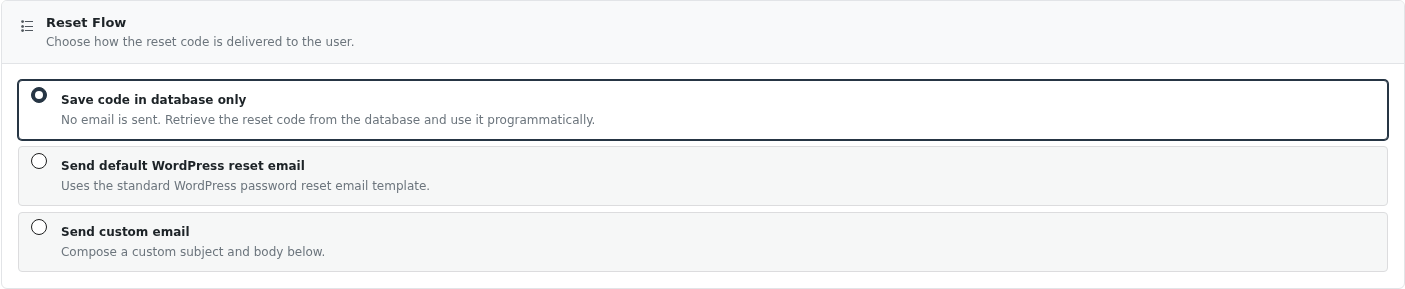
Choose how the reset code is delivered to the user after a successful Step 1 request:
| Option | Behavior |
|---|---|
| Save code in database only | No email is sent. The reset code is saved to the database. Use this when your front-end handles its own email delivery. |
| Send default WordPress reset email | Uses the standard WordPress password reset email template. |
| Send custom email | Sends a customizable email with your own subject and body. Subject and body are required when this option is selected. |
When Send custom email is selected, you can compose the subject and body and choose between Plain text or HTML format.
Step 2 - Set New Password
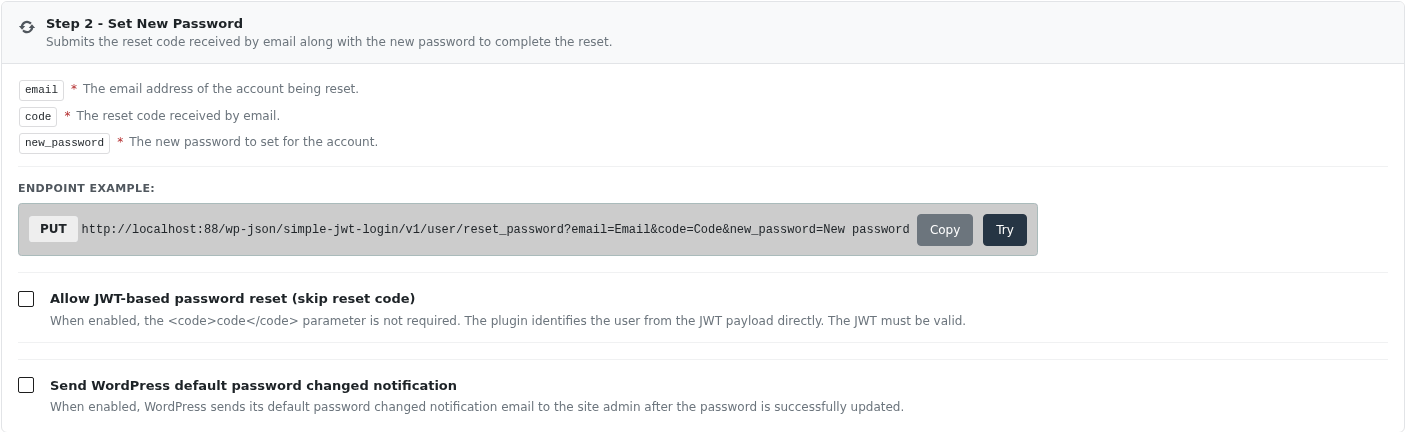
Allow JWT-based password reset (skip reset code)
When enabled, the code parameter is not required. The plugin identifies the user directly from the JWT payload. The JWT must be valid and not expired.
Send WordPress default password changed notification
When enabled, WordPress sends its default password changed notification email to the site admin after the password is successfully updated.
Features
Custom email template
When using the Send custom email flow, the body supports the following variables replaced at send time:
| Variable | Description |
|---|---|
{{CODE}} | Required. The reset password code the user must submit in Step 2. |
{{NAME}} | User's full name (first + last) |
{{USERNAME}} | WordPress username (user_login) |
{{EMAIL}} | User's email address |
{{NICKNAME}} | User's nickname |
{{FIRST_NAME}} | User's first name |
{{LAST_NAME}} | User's last name |
{{SITE}} | Website URL |
{{IP}} | IP address of the client that triggered the reset |
Example body:
Welcome {{FIRST_NAME}},

Your reset code for {{SITE}} is {{CODE}}.

This request was made from: {{IP}}
To use a fully custom template via code, use the simple_jwt_login_reset_password_custom_email_template filter:
add_filter('simple_jwt_login_reset_password_custom_email_template', function($template, $request) {
    return "
        Hello {{FIRST_NAME}},
        Here is your reset password code.

        <b>Your code</b>: {{CODE}}
    ";
}, 10, 2);