API Keys
API Keys are long-lived credentials that authenticate REST requests to any WordPress endpoint when the API key middleware is enabled. Unlike JWTs - which expire and carry user claims in the token - an API key is an opaque secret that maps to a WordPress user and a set of permissions.
Use API keys for:
- Server-to-server integrations where a persistent credential is more practical than managing token expiry
- CI/CD pipelines that need read or write access to WordPress content
- Third-party services (webhooks, schedulers) that call your WordPress REST API
Settings
Go to Settings → Simple JWT Login → API Keys to configure.

API Keys (enable/disable)
Enable or disable the API Keys feature. When disabled, the header is ignored on all requests.
Header name
The HTTP header clients must send the API key in. Default: X-API-Key. Change this only if you need to avoid a header name collision with another system.
Create API Key

Use the form in the settings page to issue a new key. Fields:
| Field | Description |
|---|---|
| Name | A human-readable label to identify the key (e.g., "Mobile App", "CI pipeline"). |
| Expires at | Optional expiry date/time. Leave blank for a non-expiring key. |
| Permissions | One or more of: read, create, update, delete. See the permissions table below. |
After clicking Create API Key, a modal appears showing the raw key value. Copy it immediately - it is shown only once and cannot be recovered.
Existing API Keys
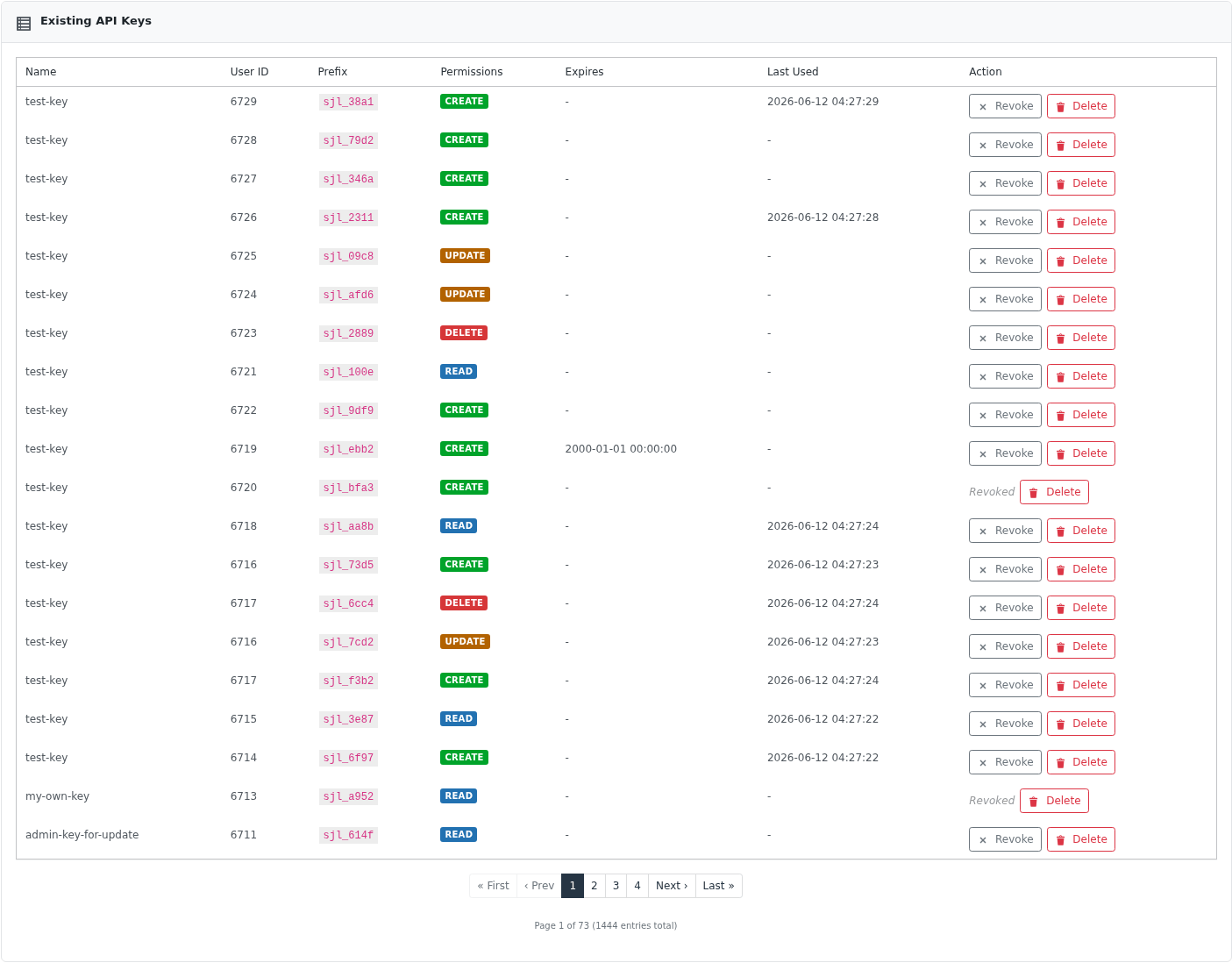
A paginated table of all keys (admins see all keys; other users see only their own). Columns: Name, Prefix, Permissions, Expires, Last Used, Action (Revoke / Delete). The User ID column is visible to admins only.
How authentication works
When API key authentication is enabled, Simple JWT Login intercepts every WordPress REST request and checks for the configured header. If the header is present, it looks up the key hash in the database, verifies the key is active (not revoked, not expired), and confirms the key has the required permission for the HTTP method being called.
Permission → HTTP method mapping:
| Permission | HTTP methods |
|---|---|
read | GET |
create | POST |
update | PUT, PATCH |
delete | DELETE |
The key itself is never stored in plain text - only its SHA-256 hash is saved. The full key is returned only once, at creation time.
Key format
Keys follow the pattern sjl_ + 32 hex characters, for example:
sjl_a1b2c3d4e5f6a1b2c3d4e5f6a1b2c3d4
The first 8 characters (sjl_a1b2 in the example) serve as a non-secret prefix shown in the list view to help you identify keys without exposing the secret.
Managing API keys - authentication
All API key management endpoints require the caller to be authenticated as a WordPress user. Two methods are accepted:
- WordPress session (cookie-based auth) - the traditional approach when calling from a browser or admin context.
- JWT - pass a valid JWT via the
Authorization: Bearer <token>header, the configured JWT header/cookie, or theJWTquery parameter. The plugin resolves the JWT to a WordPress user before processing the request.
Regular users can manage only their own keys. Administrators (manage_options capability) can manage all keys.
Endpoints
Explore and test all API key endpoints using the interactive API reference →
List API keys
METHOD: GET
ENDPOINT: /simple-jwt-login/v1/api-keys
Returns a paginated list of API keys. Only the key prefix (first 8 characters) is returned, never the full key.
Query parameters:
| Parameter | Type | Default | Description |
|---|---|---|---|
page | integer | 1 | Page number (1-based). |
per_page | integer | 20 | Results per page (1–100). |
Response 200:
{
  "success": true,
  "data": {
    "items": [
      {
        "id": 7,
        "name": "My integration key",
        "key_prefix": "sjl_a1b2****",
        "permissions": ["read", "create"],
        "expires_at": null,
        "last_used_at": "2026-04-15 10:30:00",
        "created_at": "2026-01-01 12:00:00",
        "revoked_at": null
      }
    ],
    "total": 1,
    "page": 1,
    "per_page": 20
  }
}
SHELL example (WordPress session):
curl 'https://simplejwtlogin.com/wp-json/simple-jwt-login/v1/api-keys' \
  --cookie "wordpress_logged_in_xxx=..."
SHELL example (JWT):
curl 'https://simplejwtlogin.com/wp-json/simple-jwt-login/v1/api-keys' \
  -H "Authorization: Bearer <your-jwt>"
Create an API key
METHOD: POST
ENDPOINT: /simple-jwt-login/v1/api-keys
Generates a new API key. The full plaintext key is returned only in this response - it cannot be retrieved later. Store it securely immediately (e.g., in a secrets manager or environment variable).
Request body:
{
  "name": "My integration key",
  "permissions": ["read", "create"],
  "expires_at": "2027-01-01 00:00:00"
}
| Field | Type | Description |
|---|---|---|
name | required string | Human-readable label for the key. |
permissions | required array | One or more of: read, create, update, delete. |
expires_at | optional string | Expiry date/time in Y-m-d H:i:s format. Omit for a non-expiring key. |
Response 200:
{
  "success": true,
  "data": {
    "id": 7,
    "key": "sjl_a1b2c3d4e5f6a1b2c3d4e5f6a1b2c3d4",
    "name": "My integration key",
    "key_prefix": "sjl_a1b2",
    "permissions": ["read", "create"],
    "expires_at": "2027-01-01 00:00:00"
  }
}
SHELL example (WordPress session):
curl -X POST 'https://simplejwtlogin.com/wp-json/simple-jwt-login/v1/api-keys' \
  --cookie "wordpress_logged_in_xxx=..." \
  -H "Content-Type: application/json" \
  -d '{"name":"CI pipeline","permissions":["read","create"]}'
SHELL example (JWT):
curl -X POST 'https://simplejwtlogin.com/wp-json/simple-jwt-login/v1/api-keys' \
  -H "Authorization: Bearer <your-jwt>" \
  -H "Content-Type: application/json" \
  -d '{"name":"CI pipeline","permissions":["read","create"]}'
Update an API key
METHOD: PUT
ENDPOINT: /simple-jwt-login/v1/api-keys/{id}
Updates the name, permissions, and/or expiry of an existing key. The key secret itself is not changed.
Path parameter: id - numeric ID of the key (returned when listing or creating).
Request body:
{
  "name": "Updated key name",
  "permissions": ["read", "create", "update"],
  "expires_at": "2028-06-01 00:00:00"
}
Response 200:
{
  "success": true,
  "message": "API key updated successfully."
}
SHELL example (WordPress session):
curl -X PUT 'https://simplejwtlogin.com/wp-json/simple-jwt-login/v1/api-keys/7' \
  --cookie "wordpress_logged_in_xxx=..." \
  -H "Content-Type: application/json" \
  -d '{"name":"Readonly key","permissions":["read"]}'
SHELL example (JWT):
curl -X PUT 'https://simplejwtlogin.com/wp-json/simple-jwt-login/v1/api-keys/7' \
  -H "Authorization: Bearer <your-jwt>" \
  -H "Content-Type: application/json" \
  -d '{"name":"Readonly key","permissions":["read"]}'
Revoke an API key
METHOD: POST
ENDPOINT: /simple-jwt-login/v1/api-keys/{id}/revoke
Soft-deletes the key by recording a revoked_at timestamp. The record is kept in the database (useful for auditing), but the middleware will reject the key immediately. To permanently remove the record, use the permanent delete endpoint.
Path parameter: id - numeric ID of the key.
Response 200:
{
  "success": true,
  "message": "API key revoked successfully."
}
SHELL example (WordPress session):
curl -X POST 'https://simplejwtlogin.com/wp-json/simple-jwt-login/v1/api-keys/7/revoke' \
  --cookie "wordpress_logged_in_xxx=..."
SHELL example (JWT):
curl -X POST 'https://simplejwtlogin.com/wp-json/simple-jwt-login/v1/api-keys/7/revoke' \
  -H "Authorization: Bearer <your-jwt>"
Permanently delete an API key
METHOD: DELETE
ENDPOINT: /simple-jwt-login/v1/api-keys/{id}
Permanently removes the key record from the database. This action is irreversible. Prefer revoke when you want to disable a key but retain the audit record.
Path parameter: id - numeric ID of the key.
Response 200:
{
  "success": true,
  "message": "API key deleted successfully."
}
SHELL example (WordPress session):
curl -X DELETE 'https://simplejwtlogin.com/wp-json/simple-jwt-login/v1/api-keys/7' \
  --cookie "wordpress_logged_in_xxx=..."
SHELL example (JWT):
curl -X DELETE 'https://simplejwtlogin.com/wp-json/simple-jwt-login/v1/api-keys/7' \
  -H "Authorization: Bearer <your-jwt>"
Using an API key in requests
Once you have a key, include it in the configured header on every request:
curl 'https://simplejwtlogin.com/wp-json/wp/v2/posts' \
  -H "X-API-Key: sjl_a1b2c3d4e5f6a1b2c3d4e5f6a1b2c3d4"
If you changed the header name in the plugin settings, use that name instead.
Error responses
All error responses from the API key endpoints follow the standard envelope:
{
  "success": false,
  "data": {
    "message": "Human-readable error description",
    "errorCode": 84
  }
}
Common error codes:
| Code | Meaning |
|---|---|
84 | Unauthorized - no active WordPress session and no valid JWT, or permission denied. |
85 | Bad request - key name is missing or no permissions were specified. |
88 | Database insert failed when creating a key. |
89 | No key found with the provided ID. |
90 | Database update failed when updating a key. |
91 | Database operation failed when revoking a key. |
92 | Database operation failed when permanently deleting a key. |
FAQ
Can I use a JWT to manage API keys?
Yes. All /simple-jwt-login/v1/api-keys endpoints accept a valid JWT in place of a WordPress session cookie. Pass it via Authorization: Bearer <token> or through whichever JWT transport is configured in the plugin settings.
Can I use an API key instead of a JWT for Simple JWT Login's own endpoints?
No. API keys authenticate requests to standard WordPress REST endpoints (e.g., /wp/v2/posts). Simple JWT Login's own endpoints (/simple-jwt-login/v1/auth, /simple-jwt-login/v1/users, etc.) use JWT-based authentication as documented on their respective pages.
What happens if a key expires?
The middleware checks the expires_at timestamp on every request. Once the current time passes the expiry, the key is rejected as if it were revoked. Update the key with a new expires_at to extend its lifetime.
Is the full key stored anywhere?
No. Only the SHA-256 hash of the key is persisted. The plaintext key is returned once at creation and is not recoverable. If a key is lost, revoke or delete it and create a new one.
Who can see other users' keys?
Regular users can only list, update, revoke, and delete their own keys. WordPress administrators (users with the manage_options capability) can manage all keys and will also see the user_id field in list responses to identify key ownership.