Todo App with Vanilla JS
Introduction
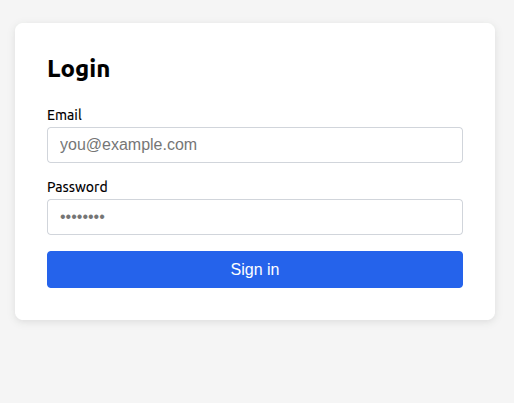
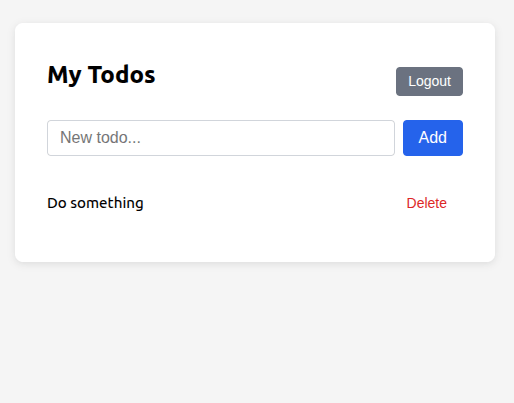
This example builds a minimal todo app using plain JavaScript and WordPress as the backend. Each todo is stored as a private WordPress post, so they are only visible to the authenticated user. Authentication is handled by Simple JWT Login.
The app covers four operations:
- Login - exchange credentials for a JWT
- List todos - fetch the user's private posts
- Add a todo - create a new private post
- Delete a todo - permanently remove a post
Prerequisites
Before running this example, make sure the following plugin settings are enabled:
| Setting | Value |
|---|---|
| Allow Authentication | Yes |
| All WordPress endpoints check for JWT | Yes |
| CORS | Enabled |
The "All WordPress endpoints check for JWT" option (under General Settings) is required so that the WordPress REST API (/wp/v2/posts) accepts the JWT issued by Simple JWT Login.
CORS must be enabled so that the browser can make requests to your WordPress domain from a different origin. Configure the allowed origins in the plugin's CORS settings to match the domain where your app is hosted.
Step 1: Login and obtain a JWT
Send the user's credentials to the Simple JWT Login auth endpoint. Store the returned JWT so it can be attached to every subsequent request.
const DOMAIN = 'https://your-wordpress-site.com';

async function login(email, password) {
  const response = await fetch(`${DOMAIN}?rest_route=/simple-jwt-login/v1/auth`, {
    method: 'POST',
    headers: { 'Content-Type': 'application/json' },
    body: JSON.stringify({ email, password }),
  });

  const json = await response.json();

  if (!json.success) {
    throw new Error(json.data?.message ?? 'Login failed');
  }

  return json.data.jwt;
}
Step 2: Fetch todos
Private posts are only returned when the request is authenticated. Pass the JWT in the Authorization header.
async function fetchTodos(jwt) {
  const response = await fetch(
    `${DOMAIN}?rest_route=/wp/v2/posts&status=private&per_page=100`,
    {
      headers: { Authorization: jwt },
    }
  );

  if (!response.ok) {
    throw new Error('Failed to fetch todos');
  }

  return response.json(); // Array of post objects
}
Step 3: Add a todo
Create a new private post. The post title holds the todo text; status: "private" keeps it visible only to the owner.
async function addTodo(jwt, title) {
  const response = await fetch(`${DOMAIN}?rest_route=/wp/v2/posts`, {
    method: 'POST',
    headers: {
      'Content-Type': 'application/json',
      Authorization: jwt,
    },
    body: JSON.stringify({ title, status: 'private' }),
  });

  if (!response.ok) {
    throw new Error('Failed to create todo');
  }

  return response.json(); // The newly created post
}
Step 4: Delete a todo
Delete a post by its ID. Add ?force=true to bypass the WordPress trash and permanently remove it.
async function deleteTodo(jwt, postId) {
  const response = await fetch(
    `${DOMAIN}?rest_route=/wp/v2/posts/${postId}&force=true`,
    {
      method: 'DELETE',
      headers: { Authorization: jwt },
    }
  );

  if (!response.ok) {
    throw new Error('Failed to delete todo');
  }
}
Full example
The complete single-file app below wires everything together. Save it as index.html, update DOMAIN at the top, and open it in a browser.
<!DOCTYPE html>
<html lang="en">
<head>
<meta charset="UTF-8" />
<meta name="viewport" content="width=device-width, initial-scale=1.0" />
<title>Todo App - Simple JWT Login</title>
<style>
*, *::before, *::after { box-sizing: border-box; margin: 0; padding: 0; }
body {
font-family: system-ui, sans-serif;
background: #f5f5f5;
display: flex;
justify-content: center;
padding: 2rem 1rem;
min-height: 100vh;
}
.card {
background: #fff;
border-radius: 8px;
box-shadow: 0 2px 8px rgba(0,0,0,.1);
padding: 2rem;
width: 100%;
max-width: 480px;
height: fit-content;
}
h1 { font-size: 1.5rem; margin-bottom: 1.5rem; }
label { display: block; font-size: .875rem; margin-bottom: .25rem; }
input[type="email"],
input[type="password"],
input[type="text"] {
width: 100%;
padding: .5rem .75rem;
border: 1px solid #d1d5db;
border-radius: 4px;
font-size: 1rem;
margin-bottom: 1rem;
}
button {
width: 100%;
padding: .6rem 1rem;
background: #2563eb;
color: #fff;
border: none;
border-radius: 4px;
font-size: 1rem;
cursor: pointer;
}
button:hover { background: #1d4ed8; }
button.danger { background: transparent; color: #dc2626; border: none; width: auto; font-size: .875rem; cursor: pointer; }
button.danger:hover { text-decoration: underline; }
button.secondary { background: #6b7280; margin-top: .75rem; }
button.secondary:hover { background: #4b5563; }
.error { color: #dc2626; font-size: .875rem; margin-bottom: 1rem; }
.todo-form { display: flex; gap: .5rem; margin-bottom: 1.25rem; }
.todo-form input { margin-bottom: 0; flex: 1; }
.todo-form button { width: auto; padding: .5rem 1rem; }
ul { list-style: none; }
li {
display: flex;
justify-content: space-between;
align-items: center;
padding: .6rem 0;
border-bottom: 1px solid #f3f4f6;
font-size: .95rem;
}
li:last-child { border-bottom: none; }
.empty { color: #9ca3af; font-size: .9rem; text-align: center; padding: 1rem 0; }
header { display: flex; justify-content: space-between; align-items: center; margin-bottom: 1.5rem; }
header h1 { margin-bottom: 0; }
header button { width: auto; padding: .4rem .75rem; font-size: .875rem; }
</style>
</head>
<body>
<div class="card" id="app"></div>
<script>
const DOMAIN = 'https://your-wordpress-site.com'; // Replace with your site
// ----- State -----
let jwt = localStorage.getItem('sjl_jwt') ?? null;
// ----- API -----
async function apiLogin(email, password) {
const res = await fetch(`${DOMAIN}?rest_route=/simple-jwt-login/v1/auth`, {
method: 'POST',
headers: { 'Content-Type': 'application/json' },
body: JSON.stringify({ email, password }),
});
const json = await res.json();
if (!json.success) throw new Error(json.data?.message ?? 'Login failed');
return json.data.jwt;
}
async function apiFetchTodos() {
const res = await fetch(
`${DOMAIN}?rest_route=/wp/v2/posts&status=private&per_page=100`,
{ headers: { Authorization: jwt } }
);
if (!res.ok) throw new Error('Failed to load todos');
return res.json();
}
async function apiAddTodo(title) {
const res = await fetch(`${DOMAIN}?rest_route=/wp/v2/posts`, {
method: 'POST',
headers: { 'Content-Type': 'application/json', Authorization: jwt },
body: JSON.stringify({ title, status: 'private' }),
});
if (!res.ok) throw new Error('Failed to create todo');
return res.json();
}
async function apiDeleteTodo(id) {
const res = await fetch(
`${DOMAIN}?rest_route=/wp/v2/posts/${id}&force=true`,
{ method: 'DELETE', headers: { Authorization: jwt } }
);
if (!res.ok) throw new Error('Failed to delete todo');
}
// ----- Render -----
const app = document.getElementById('app');
function renderLogin(errorMsg = '') {
app.innerHTML = `
`;
document.getElementById('loginBtn').addEventListener('click', async () => {
const email = document.getElementById('email').value.trim();
const password = document.getElementById('password').value;
try {
jwt = await apiLogin(email, password);
localStorage.setItem('sjl_jwt', jwt);
await renderTodos();
} catch (err) {
renderLogin(err.message);
}
});
}
async function renderTodos(errorMsg = '') {
app.innerHTML = `
`;
document.getElementById('logoutBtn').addEventListener('click', () => {
jwt = null;
localStorage.removeItem('sjl_jwt');
renderLogin();
});
document.getElementById('addBtn').addEventListener('click', async () => {
const input = document.getElementById('newTodo');
const title = input.value.trim();
if (!title) return;
try {
await apiAddTodo(title);
input.value = '';
await refreshList();
} catch (err) {
renderTodos(err.message);
}
});
document.getElementById('newTodo').addEventListener('keydown', (e) => {
if (e.key === 'Enter') document.getElementById('addBtn').click();
});
await refreshList();
}
async function refreshList() {
const list = document.getElementById('list');
if (!list) return;
try {
const todos = await apiFetchTodos();
if (todos.length === 0) {
list.innerHTML = '<li class="empty">No todos yet. Add one above!</li>';
return;
}
list.innerHTML = todos
.map(
(todo) => `
<li>
<span>${todo.title.rendered}</span>
<button class="danger" data-id="${todo.id}">Delete</button>
</li>
`
)
.join('');
list.querySelectorAll('button[data-id]').forEach((btn) => {
btn.addEventListener('click', async () => {
try {
await apiDeleteTodo(btn.dataset.id);
await refreshList();
} catch (err) {
renderTodos(err.message);
}
});
});
} catch (err) {
// JWT may have expired - return to login
jwt = null;
localStorage.removeItem('sjl_jwt');
renderLogin(err.message);
}
}
// ----- Boot -----
if (jwt) {
renderTodos();
} else {
renderLogin();
}
</script>
</body>
</html>
How it works
┌─────────────┐     POST /simple-jwt-login/v1/auth      ┌───────────────┐
│   Browser   │ ──────────────────────────────────────> │   WordPress   │
│             │ <─────────────── { jwt }  ────────────  │ + Simple JWT  │
│  (stores    │                                         │   Login       │
│   JWT in    │     GET  /wp/v2/posts?status=private    │               │
│ localStorage│ ──── Authorization: {jwt} ────────────> │               │
│             │ <────────── [ private posts ] ───────── │               │
│             │                                         │               │
│             │     POST /wp/v2/posts                   │               │
│             │ ──── Authorization: {jwt} ────────────> │               │
│             │ <──────────── { new post } ──────────── │               │
└─────────────┘                                         └───────────────┘
- The JWT is kept in
localStorageso the user stays logged in across page reloads. - Todos are stored as private WordPress posts - only the authenticated user can read or modify them.
- When a request returns an error (e.g. expired JWT), the app clears the stored token and redirects to the login screen.